Pinterest, the popular visual discovery platform, relies heavily on images to engage users. However, it’s not uncommon for users to encounter issues with images not displaying properly. This can be frustrating, especially when browsing through boards or searching for inspiration.
There are several reasons why Pinterest might not be showing images as expected. From network connectivity problems to browser cache issues, the root cause can vary. Understanding these potential factors is crucial for troubleshooting and resolving the problem efficiently. By exploring common culprits and implementing targeted solutions, users can restore their Pinterest experience to its full visual glory.
Key Takeaways
Network issues, browser cache problems, and outdated apps are common reasons for Pinterest not showing images
Clearing browser cache and cookies can often resolve image display issues on desktop
Mobile users should keep the Pinterest app updated and check widget settings to troubleshoot image problems
Pinterest debug tools can help identify technical issues affecting image display
Optimizing image formats, sizes, and adhering to Pinterest’s guidelines improve overall image visibility
Understanding Pinterest Image Display Issues
Pinterest image display issues can stem from various factors, affecting users’ ability to view and interact with content on the platform. Understanding these issues is crucial for troubleshooting and resolving problems effectively.
Common Causes of Images Not Showing
Several reasons can contribute to images not displaying on Pinterest:
Network connectivity problems: Slow or unstable internet connections often prevent images from loading properly.
Browser cache and cookies: Outdated or corrupted browser data can interfere with image display.
Outdated app or browser: Using an older version of the Pinterest app or web browser may cause compatibility issues.
Image format incompatibility: Some image formats may not be supported by Pinterest, leading to display problems.
Content blocking: Firewalls or content filters can sometimes prevent images from loading on certain networks.
Lazy loading implementation: Websites using lazy loading techniques may not properly trigger image loading for Pinterest.
Incorrect image attributes: Improperly configured image tags or missing metadata can hinder Pinterest’s ability to display images.
Understanding these common causes helps users identify and address the root of their Pinterest image display issues more effectively.
Troubleshooting Steps for Desktop Users
For desktop users experiencing issues with Pinterest not showing images, several troubleshooting steps can help resolve the problem. These steps focus on common causes and provide practical solutions to get images displaying correctly again.
Clearing Browser Cache and Cookies
Clearing browser cache and cookies often resolves image display issues on Pinterest. Users should:
Open their browser settings
Navigate to the privacy or history section
Select the option to clear browsing data
Choose to clear cache and cookies
Specify the time range (preferably “All time”)
Click “Clear data” or equivalent button
After clearing cache and cookies, users should restart their browser and revisit Pinterest to check if images are now displaying correctly.
Checking Image Implementation
Proper image implementation is crucial for Pinterest to display images correctly. Users can:
Right-click on an empty image area and select “Inspect” or “Inspect Element”
Look for the image tag (
) in the HTML code
Verify the “src” attribute contains a valid image URL
Check for any error messages in the browser’s console
If the image URL is invalid or returns an error, users should report the issue to Pinterest support. Additionally, they can try accessing Pinterest from a different browser to determine if the problem is browser-specific.
Mobile App Troubleshooting
Mobile users experiencing issues with Pinterest not showing images can often resolve the problem through app-specific solutions. These troubleshooting steps focus on updating the app and addressing widget display problems.
Updating the Pinterest App
Keeping the Pinterest app up-to-date is crucial for optimal performance and image display. Here’s how to update the app on different mobile platforms:
For Android:
Open the Google Play Store app
Tap the menu icon and go to “My apps & games”
Find Pinterest in the list and tap “Update” if available
For iOS:
Open the App Store
Tap the profile icon at the top of the screen
Scroll to see pending updates and release notes
Tap “Update” next to Pinterest if an update is available
If updating doesn’t resolve the issue, uninstalling and reinstalling the app can provide a fresh start:
On Android:
Go to Settings, then Apps
Find Pinterest and tap “Uninstall”
Return to the Google Play Store to download and install it again
On iOS:
Press and hold the Pinterest app icon
Tap “Delete App” and confirm
Visit the App Store to download a fresh copy of Pinterest
Resolving Widget Display Problems
If Pinterest widgets on your mobile device aren’t displaying images correctly:
Ensure your device has a stable internet connection
Check if the widget is up-to-date by removing and re-adding it
Verify that your Pinterest account is properly linked to the widget
Clear the app’s cache through your device’s settings
Make sure your device’s operating system is current
By following these mobile-specific troubleshooting steps, users can often resolve issues with Pinterest not showing images on their smartphones or tablets.
Technical Solutions
For users wondering “why is my Pinterest not showing images,” there are advanced technical solutions available. These methods can help diagnose and resolve more complex issues affecting image display on Pinterest.
Using Pinterest Debug Tools
Pinterest offers debug tools that can help identify and resolve image display issues. These tools provide insights into how Pinterest sees and processes content from a specific URL. To use the debug tools:
Visit the Pinterest Developer Tools page
Enter the URL of the page with missing images
Click “Debug” to run the analysis
Review the results for any errors or warnings related to image processing
The debug report highlights potential issues with image metadata, pin descriptions, or other technical factors that may prevent images from displaying correctly on Pinterest.
Addressing Rate Limiting and Traffic Drops
Rate limiting and sudden traffic drops can sometimes cause images to stop displaying on Pinterest. To address these issues:
Monitor your Pinterest analytics for sudden changes in traffic
Check if you’re experiencing API rate limits (for business accounts)
Ensure your website can handle increased traffic from Pinterest
Implement caching mechanisms to reduce server load
Use a content delivery network (CDN) to improve image loading speeds
If rate limiting is detected, consider spreading out your pinning activity or upgrading to a business account for higher limits. For traffic drops, analyze your content strategy and ensure you’re consistently sharing high-quality, relevant images that align with Pinterest’s best practices.
Best Practices for Image Visibility
Ensuring your images are visible on Pinterest is crucial for maximizing engagement and reaching your target audience. Implementing best practices for image optimization and adhering to Pinterest’s guidelines can help resolve issues related to “why is my Pinterest not showing images” and improve overall visibility.
Optimizing Image Formats and Sizes
To enhance image visibility on Pinterest, users should focus on optimizing image formats and sizes. Pinterest recommends using high-quality, vertical images with a 2:3 aspect ratio (e.g., 1000 x 1500 pixels) for optimal display across devices. JPEG and PNG formats are preferred, with file sizes kept under 20MB. Utilizing descriptive, keyword-rich file names and alt text can also improve image discoverability and accessibility.
Adhering to Pinterest’s Guidelines
Following Pinterest’s content guidelines is essential for maintaining image visibility and avoiding potential issues. Users should ensure their content is original, authentic, and doesn’t violate copyright or trademark laws. Pinterest prohibits explicit or adult content, hate speech, and misleading information. Regularly reviewing and updating boards to remove any content that may violate these guidelines can help prevent image display problems and account restrictions.
When to Contact Pinterest Support
While many issues with Pinterest not showing images can be resolved through troubleshooting steps, there are instances when contacting Pinterest support becomes necessary. Users should reach out to Pinterest’s support team in the following situations:
Persistent image display problems: If images consistently fail to load after trying all recommended troubleshooting steps, it’s time to seek professional assistance.
Account-specific issues: When the problem appears to be isolated to a particular account rather than a device or network.
Suspected technical glitches: If users notice widespread issues affecting multiple accounts or devices, it may indicate a platform-wide problem.
Copyright infringement concerns: Users who discover their content being used without permission should contact support to report the violation.
Account suspension or restrictions: If an account is unexpectedly suspended or experiences limitations, contacting support can help resolve the issue.
To effectively communicate with Pinterest support:
Use the contact forms on Pinterest’s Help Center for specific issues
Provide clear, concise descriptions of the problem, including steps taken to troubleshoot
Include relevant details such as account information, device type, and operating system
Attach screenshots or error messages to illustrate the issue
By contacting Pinterest support in these situations, users can address complex problems and ensure a smoother experience on the platform. Prompt communication with the support team can lead to quicker resolution of issues related to Pinterest not showing images, allowing users to fully enjoy the visual discovery platform.
Conclusion
Resolving image display issues on Pinterest requires a systematic approach. By understanding common causes and following troubleshooting steps users can often restore their visual experience on the platform. For persistent problems advanced techniques and best practices can further enhance image visibility.
Keeping apps and browsers updated clearing caches and optimizing image formats are crucial steps. When issues persist contacting Pinterest support with clear descriptions and relevant details can lead to effective solutions. With these strategies users can overcome image display challenges and fully enjoy Pinterest’s visual discovery experience.
Artificial intelligence has revolutionized the world of photography, and AI photo generators are at the forefront of this exciting transformation. These cutting-edge tools are empowering artists, designers, and everyday users to create stunning visuals with just a few clicks.
From turning text descriptions into lifelike images to enhancing low-quality photos, AI photo generators are pushing the boundaries of what’s possible in digital imagery. They’re not just tools; they’re gateways to unleashing creativity and bringing imagination to life. As these technologies continue to evolve, they’re opening up new realms of artistic expression and visual communication.
What Is an AI Photo Generator?
AI photo generators are cutting-edge tools that harness the power of artificial intelligence to create, edit, and enhance images. These revolutionary systems utilize complex algorithms and machine learning techniques to produce stunning visuals from textual descriptions or transform existing images in ways previously unimaginable.
Unlike traditional stock photo services like Getty Images or Adobe Stock Photos, AI photo generators create unique, original images on demand. They offer an exciting alternative for artists, designers, and content creators who seek fresh, customizable visuals without the limitations of pre-existing photo libraries.
AI photo generators excel at:
Transforming text descriptions into vivid images
Enhancing low-resolution photos to crystal-clear quality
Generating diverse variations of existing images
Creating fantastical scenes that defy reality
Seamlessly blending multiple image styles
These innovative tools open up a world of possibilities for visual content creation, allowing users to bring their wildest imaginings to life with unprecedented ease and speed. As AI technology continues to advance, the capabilities of these photo generators are expanding rapidly, revolutionizing the way we approach digital imagery and artistic expression.
How AI Photo Generators Work
AI photo generators operate through a series of sophisticated steps, harnessing the power of machine learning and neural networks to create stunning visuals:
Data Collection and Training AI models ingest vast datasets of images, learning patterns, styles, and compositions from millions of examples. This process enables the AI to understand visual elements and their relationships.
Input Processing Users provide prompts or seed images to the AI. Text descriptions are analyzed for key concepts, while seed images are broken down into essential components.
Image Synthesis The AI utilizes generative adversarial networks (GANs) or diffusion models to construct new images based on the input. It combines learned patterns and styles to create coherent visuals.
Iterative Refinement Multiple iterations refine the generated image, adjusting details, colors, and compositions to match the user’s intent more closely.
Style Transfer and Enhancement Advanced AI photo generators apply specific artistic styles or enhance image quality, mimicking techniques like those found in traditional photography or digital art.
Output Generation The final image is produced, often with options for further customization or variation generation.
This process revolutionizes image creation, offering an exciting alternative to conventional stock photo services like Getty Images or Adobe Stock Photos. AI generators provide unlimited, unique visuals tailored to specific needs, expanding creative possibilities beyond pre-existing image libraries.
Factors to Consider When Choosing the Best AI Photo Generator
Image Quality and Accuracy
AI photo generators produce images of varying quality and accuracy. Top-tier generators create high-resolution visuals with lifelike details and textures. They accurately interpret text prompts and generate images that closely match the described concepts. Advanced AI models excel at rendering complex scenes coherently while maintaining visual consistency across elements.
Ease of Use
User-friendly interfaces enhance the experience of working with AI photo generators. Intuitive platforms allow users to input text prompts effortlessly and adjust parameters with minimal learning curve. The best generators offer clear instructions streamlined workflows and responsive controls for efficient image creation. Some provide pre-set templates or guided modes to assist beginners in producing quality results quickly.
Customization Options
Robust customization features empower users to fine-tune generated images. Advanced AI photo generators offer granular control over aspects like composition lighting style and color palette. They allow users to specify detailed attributes for characters objects and environments. The ability to iterate on results and make precise adjustments ensures the final output aligns closely with the user’s vision.
Commercial Usage Rights
Understanding the licensing terms for AI-generated images is crucial for commercial applications. Some AI photo generators grant full commercial rights allowing unrestricted use of created images in marketing materials and products. Others may have limitations or require additional licensing for commercial purposes. Users should carefully review the terms to ensure compliance and avoid potential legal issues when using AI-generated visuals for business purposes.
Cost and Pricing Models
AI photo generators offer various pricing structures to accommodate different needs and budgets. Options range from free tiers with limited features to premium subscriptions with advanced capabilities. Some platforms charge per image generated while others provide unlimited generations within a subscription period. Users should evaluate their usage requirements and compare pricing models to find the most cost-effective solution for their specific needs.
Top AI Photo Generators Compared
AI photo generators have revolutionized image creation, offering unique alternatives to traditional stock photo services. Let’s compare some of the top AI photo generators based on specific use cases and features.
Best for Beginners
DALL-E 2 stands out as the go-to choice for newcomers to AI image generation. Its intuitive interface and straightforward prompting system make it easy for beginners to create stunning visuals without extensive technical knowledge. DALL-E 2 offers a user-friendly experience with:
Simple text-to-image conversion
Guided tutorials for prompt creation
Built-in editing tools for refining generated images
Diverse style options for experimentation
Best for Professional Results
Midjourney excels in producing high-quality, photorealistic images suitable for professional use. Its advanced algorithms generate visuals that rival those found on premium stock photo sites like Getty Images. Midjourney’s strengths include:
Exceptional detail and texture rendering
Sophisticated lighting and shadow effects
Ability to create complex, multi-element compositions
High-resolution output for print and digital media
Best for Text-to-Image Accuracy
Stable Diffusion leads the pack in translating detailed text descriptions into precise visual representations. Its advanced natural language processing capabilities ensure that generated images closely match user prompts. Stable Diffusion offers:
Highly accurate interpretation of complex prompts
Consistency in generating specific styles or themes
Fine-grained control over image elements
Ability to maintain brand-specific visual guidelines
Extensive customization options for color, composition, and style
Integration with Adobe Creative Cloud applications
Tools for blending AI-generated elements with existing images
Options to generate variations based on specific attributes
How to Use an AI Photo Generator Effectively
Writing Effective Prompts
Crafting precise prompts unlocks the full potential of AI photo generators. Start with clear, descriptive language that specifies the subject, setting, and mood. Include details like lighting, color palette, and artistic style to guide the AI. For example, instead of “a cat,” try “a fluffy orange tabby cat basking in warm sunlight on a windowsill, with a cozy living room visible in the background.” Experiment with different phrasings and word choices to refine results.
Refining and Iterating Results
AI-generated images often require fine-tuning to achieve the desired outcome. Analyze initial results and adjust prompts accordingly. Add or remove elements, modify descriptors, or experiment with different style references. Many AI photo generators offer features like inpainting or outpainting to edit specific areas of the image. Utilize these tools to refine details, adjust compositions, or expand the canvas. Iterative refinement often leads to stunning visuals that surpass traditional stock photo offerings from platforms like Getty Images or Adobe Stock Photos.
Tips for Composition and Detail
Enhance AI-generated images by focusing on composition and detail:
Use the rule of thirds to create balanced compositions
Specify focal points to draw attention to key elements
Incorporate depth by mentioning foreground, middle ground, and background
Request specific textures and materials for added realism
Include lighting directions and types for dramatic effects
Mention reflections or shadows to ground objects in the scene
By applying these techniques, users can create unique, high-quality visuals that rival or exceed those found in traditional stock photo libraries, offering a fresh alternative to Getty Images and Adobe Stock Photos.
Ethical and Legal Considerations
Copyright Issues
AI photo generators revolutionize image creation but raise complex copyright questions. Unlike traditional stock photo services like Getty Images or Adobe Stock Photos, AI-generated images blur the lines of ownership and attribution. Users must understand:
Ownership ambiguity: AI-generated images may not have clear copyright holders, as they’re created by algorithms trained on vast datasets.
Potential infringement: Images produced by AI might inadvertently replicate copyrighted elements from training data.
Licensing complexity: Each AI platform has unique terms of service that dictate how users can utilize generated images commercially.
Fair use limitations: The application of fair use doctrine to AI-generated content remains a gray area in copyright law.
Users should thoroughly review platform policies and consult legal experts when using AI-generated images for commercial purposes to avoid potential copyright disputes.
Proper Disclosure of AI-Generated Images
Transparency about the origin of AI-generated images is crucial for maintaining ethical standards and building trust. Users should:
Clearly label AI content: Indicate when images are AI-generated in publications, social media posts, or commercial materials.
Provide platform attribution: Mention the specific AI tool used to create the image, such as DALL-E 2 or Midjourney.
Disclose editing: If AI-generated images are further modified, acknowledge both the AI generation and subsequent edits.
Respect platform guidelines: Follow disclosure requirements set by AI photo generator platforms.
Educate audiences: Help viewers understand the capabilities and limitations of AI-generated imagery.
By adopting these practices, users can harness the creative potential of AI photo generators while upholding ethical standards and fostering transparency in visual content creation.
Troubleshooting Common Issues
Image Quality Problems
Blurry or pixelated images often result from insufficient input detail. Users should provide more specific prompts with vivid descriptions of textures colors and compositions. Experimenting with different resolution settings and upscaling techniques can also enhance image clarity.
Unexpected or Inaccurate Results
When AI-generated images don’t match expectations users should refine their prompts. Adding qualifiers like “photorealistic” “high-quality” or “detailed” can improve output. Users can also try breaking complex prompts into simpler components for more accurate results.
Limited Style Options
Some AI generators struggle with specific artistic styles. Users facing this issue can explore style transfer techniques or seek alternative platforms specializing in their desired aesthetic. Combining multiple generators’ outputs can also yield unique stylistic results.
Watermarks or Unwanted Elements
Persistent watermarks or logos in generated images may indicate copyright issues. Users should verify the AI model’s training data and ensure they’re not inadvertently recreating copyrighted content from sources like Getty Images or Adobe Stock Photos.
Generation Speed Issues
Slow image generation often stems from high server load or limited computational resources. Users can try off-peak hours for faster results or consider upgrading to premium services for priority processing.
Inconsistent Results Across Sessions
AI models occasionally produce varying results for identical prompts. Users should save successful prompts and generated images for future reference. Some platforms offer seed values to reproduce specific outputs consistently.
Difficulty with Text Integration
When struggling to incorporate text into generated images users can try text-specific prompts or use post-processing tools. Some AI generators excel at creating images with integrated text while others may require manual editing.
Color Accuracy Problems
To address color discrepancies users should use precise color descriptions in their prompts. Specifying exact hex codes or using universally recognized color names can improve accuracy. Post-generation color correction tools can also help achieve desired palettes.
Future of AI Photo Generation
AI photo generation technology is poised for explosive growth, promising to revolutionize visual content creation. As these systems evolve, they’ll challenge traditional stock photo services like Getty Images and Adobe Stock Photos, offering unparalleled customization and creativity.
Enhanced Realism and Detail
Future AI photo generators will produce images indistinguishable from real photographs. Advanced algorithms will capture nuanced textures, lighting, and depth, creating hyper-realistic visuals that surpass current capabilities.
Seamless Integration with Other AI Technologies
AI photo generation will integrate with natural language processing and computer vision, enabling users to create images through conversational interfaces or by describing scenes in their own words.
Real-Time Generation and Editing
Upcoming iterations will offer real-time image generation and editing capabilities. Users will manipulate AI-generated photos instantly, adjusting elements on-the-fly for perfect results.
Personalized Content Creation
Future AI systems will learn individual user preferences, automatically generating tailored images that align with specific artistic styles or brand guidelines.
Ethical and Legal Advancements
As the technology matures, clearer guidelines and regulations will emerge regarding copyright, ownership, and ethical use of AI-generated images, addressing current concerns in the industry.
Democratization of Visual Content
AI photo generation will become more accessible, allowing individuals and businesses of all sizes to create professional-quality visuals without the need for expensive equipment or specialized skills.
Cross-Platform Compatibility
Future AI photo generators will seamlessly integrate with various design tools and platforms, streamlining workflows for creative professionals and casual users alike.
Conclusion
AI photo generators are revolutionizing digital imagery and artistic expression! These innovative tools offer endless possibilities for creating stunning visuals with unprecedented ease and speed. As the technology evolves it’s poised to challenge traditional stock photo services and democratize content creation.
The future of AI photo generation looks incredibly bright! We can expect hyper-realistic images real-time editing and personalized content tailored to individual preferences. With clearer ethical guidelines and improved cross-platform compatibility AI photo generators will continue to transform the visual landscape for both professionals and casual users alike.
Ever feel like your day could use a splash of color? Well, buckle up, buttercup! We’re about to embark on a whimsical journey through the world of free images that’ll turn your frown upside down faster than you can say “cheese!”
Key Takeaways
Free mood-boosting images include cute animals, nature scenes, inspiring quotes, and heartwarming human moments
Popular sources for free images include stock photo websites, social media platforms, and public domain collections
Choose high-quality images that match your mood and purpose for maximum impact
Use uplifting images creatively as wallpapers, social media content, and personalized greeting cards
Create your own mood-lifting images by embracing creativity, capturing everyday joy, and adding witty captions
Types of Uplifting Free Images
Ready to embark on a visual journey that’ll turn your frown upside down? Let’s dive into the world of mood-boosting pixels!
Cute Animal Photos
Imagine scrolling through your feed and BAM! A puppy’s derpy face appears. Instant serotonin boost, right? When you search for free images of adorable critters, you’ll find:
Kittens tangled in yarn (because who doesn’t love a feline fail?)
Baby elephants trying to use their trunks (spoiler: it’s hilarious)
Otters holding hands while napping (relationship goals, anyone?)
These furry, feathered, or scaly friends are guaranteed to make you say “Aww!” louder than your neighbor’s lawnmower at 7 AM on a Saturday.
Nature and Landscapes
Mother Nature’s got some serious Photoshop skills. When you explore stock photo websites for natural wonders, you’ll discover:
Sunsets that look like the sky’s on fire (in a good way)
Waterfalls so majestic, you’ll want to yodel
Fields of flowers that’ll make you sneeze just by looking at them
These images are perfect for when you need a virtual vacation from your cubicle or a reminder that the world isn’t all concrete and traffic jams.
Inspiring Quotes and Typography
Sometimes, words hit harder than a triple espresso. Free typography images offer:
Motivational quotes that’ll make you want to conquer the world (or at least your inbox)
Puns so bad, they’re good (Dad jokes, anyone?)
Sassy one-liners that speak to your inner diva
These visual pick-me-ups are like fortune cookies for your eyeballs – brief, impactful, and occasionally nonsensical.
Heartwarming Human Moments
Humans can be pretty awesome when they’re not inventing new ways to be annoying on social media. Look for images capturing:
Strangers helping strangers (faith in humanity: restored)
Kids being unintentionally hilarious (like trying to eat spaghetti for the first time)
Elderly couples still madly in love (cue the collective “Aww!”)
These snapshots of humanity at its best will remind you that the world isn’t entirely populated by internet trolls and people who talk during movies.
Where to Find Free Mood-Boosting Images
Now that you’re ready to inject some visual happiness into your life, let’s explore the treasure troves of free mood-boosting images. Get ready to embark on a pixelated adventure!
Stock Photo Websites
Search for free images on stock photo websites to uncover a goldmine of mood-lifting visuals. These Stock Photo Websites offer a smorgasbord of cheerful content:
Unsplash: Home to a cornucopia of high-quality, free-to-use images that’ll make your eyeballs dance with joy
Pexels: A virtual wonderland of photos and videos that’ll tickle your fancy without tickling your wallet
Pixabay: A treasure chest of royalty-free images, perfect for when you need a visual pick-me-up
Pro tip: Use search terms like “happy,” “joyful,” or “colorful” to find images that’ll instantly boost your mood faster than a double shot of espresso.
Social Media Platforms
Social media isn’t just for stalking your ex or arguing with strangers. It’s also a goldmine for free mood-boosting images:
Instagram: Follow accounts dedicated to positivity, cute animals, or breathtaking landscapes
Pinterest: Create boards filled with images that make you happier than a dog with two tails
Flickr: Explore user-generated content that’ll have you grinning like a Cheshire cat
Remember, scrolling through social media for mood-boosting images is like eating potato chips – it’s hard to stop at just one!
Public Domain Collections
Dive into the world of public domain images, where copyright-free content roams free like wild mustangs:
Wikimedia Commons: A vast collection of images that’ll make you feel smarter just by browsing
New York Public Library Digital Collections: Historical images that’ll transport you faster than a DeLorean time machine
NASA Image and Video Library: Out-of-this-world visuals that’ll have you seeing stars (literally)
Exploring these collections is like going on a digital scavenger hunt, except instead of finding a rusty old key, you’ll discover images that’ll skyrocket your mood to the stratosphere.
How to Choose the Perfect Image
Now that you’ve got a smorgasbord of free image sources at your fingertips, it’s time to become a picky pixel connoisseur. Here’s how to cherry-pick the crème de la crème of mood-boosting visuals:
Consider Your Mood and Purpose
Choosing an image is like picking an outfit for your emotions. Are you feeling blue and need a pick-me-up? Look for images that scream “happiness” louder than a sugar-high toddler. Want to inspire productivity? Search for visuals that make you want to conquer the world (or at least your to-do list). Remember, the right image can turn your frown upside down faster than you can say “cheese!”
Look for High-Quality Resolution
Nobody likes a fuzzy photo – unless it’s of Bigfoot. When you search for free images, make sure they’re sharp enough to cut through your bad mood. High-resolution images are like a good pair of glasses for your soul – they’ll help you see the beauty in crisp, clear detail. Plus, you don’t want your friends squinting at your social media posts, wondering if that’s a sunset or a blurry orange blob.
Creative Ways to Use Mood-Lifting Images
Desktop and Mobile Wallpapers
Transform your digital workspace into a happiness hub! Slap that adorable puppy pic or awe-inspiring sunset onto your desktop or phone screen. Every time you unlock your device, BAM! Instant mood boost. Pro tip: rotate your wallpapers weekly for a fresh dose of feel-good vibes. Who needs coffee when you’ve got a smiling sloth as your background?
Social Media Sharing
Spread the joy like butter on hot toast! Pepper your social media feeds with mood-lifting images. Create “Happy Monday” posts with motivational quotes on serene backgrounds. Or start a “Furry Friend Friday” trend, showcasing the cutest critters from your free image searches. Watch your followers’ frowns turn upside down faster than you can say “viral cat video.”
Personalized Greeting Cards
Ditch those boring store-bought cards and unleash your inner Picasso! Use free mood-boosting images to craft personalized greeting cards that’ll make your friends’ hearts melt like ice cream on a hot sidewalk. Combine a stunning landscape with a witty caption for birthdays, or pair a cute animal with a pun for get-well wishes. Your buddies will be so impressed, they might just frame your cards instead of tossing them in the junk drawer.
Tips for Creating Your Own Uplifting Images
Embrace Your Inner Artist
Unleash your inner Picasso and create mood-boosting masterpieces! Grab a pencil, paintbrush, or even a banana (hey, why not?), and let your creativity run wild. Remember, stick figures are people too, so don’t be afraid to draw outside the lines.
Capture Everyday Joy
Turn your smartphone into a happiness-hunting device. Snap photos of mundane objects that make you giggle, like that weirdly shaped potato or your cat’s judgemental stare. Bonus points if you catch your reflection mid-sneeze!
Add Witty Captions
Transform ordinary images into extraordinary mood-lifters with clever captions. Think puns, dad jokes, or even profound quotes from your goldfish. The cheesier, the better – just don’t blame us if your friends start avoiding you.
Experiment with Filters
Play mad scientist with photo editing apps. Turn your grumpy neighbor into a rainbow-colored unicorn or give your houseplant a fabulous makeover. Who knows, you might accidentally create the next viral meme!
Combine Unexpected Elements
Create visual mashups that tickle your funny bone. Photoshop your cat’s head onto a bodybuilder’s body, or place your best friend in a famous Renaissance painting. The more absurd, the more likely you’ll burst into laughter every time you see it.
Conclusion: Harnessing the Power of Positive Visuals
You’re now armed with an arsenal of free mood-boosting images and creative ideas to brighten your day. Whether you’re scrolling through adorable puppies or crafting your own visual masterpieces it’s time to embrace the power of positivity pixels!
Remember: a picture’s worth a thousand words but a funny cat meme is priceless. So go forth and conquer the world one cheerful image at a time. Your eyes (and your funny bone) will thank you!
In today’s visually-driven digital landscape, finding high-quality images for your projects can be a game-changer. Whether you’re a blogger, marketer, or designer, you know the power of stunning visuals to captivate your audience. But let’s face it – professional stock photos can be expensive.
Understanding Free Image Licensing
When searching for free images it’s crucial to understand the various licensing terms to ensure proper usage and avoid legal issues. Let’s explore the most common types of free image licenses you’ll encounter.
Creative Commons Explained
Creative Commons (CC) licenses provide a standardized way for creators to grant permission for others to use their work. These licenses allow you to use images for free while specifying certain conditions:
Attribution (BY): You must give credit to the original creator.
ShareAlike (SA): You can share and adapt the work but must license your new creation under identical terms.
NonCommercial (NC): You can use the work for non-commercial purposes only.
NoDerivatives (ND): You can use the work but cannot modify or adapt it.
CC licenses are often combined such as CC BY-SA or CC BY-NC-ND. Always check the specific license requirements before using an image.
Public Domain vs. Royalty-Free
Public Domain and Royalty-Free are two distinct concepts in image licensing:
Public Domain:
Images in the public domain are free from copyright restrictions.
You can use modify and distribute these images without permission or attribution.
Sources include works where copyright has expired or images explicitly released into the public domain.
Royalty-Free:
Despite the name “free” royalty-free images are not always free of charge.
You typically pay a one-time fee for unlimited use of the image.
No need to pay royalties or additional fees for each use.
Usage is often unrestricted but check the specific license for any limitations.
Understanding these licensing terms helps you navigate the world of free images responsibly. Always verify the license and adhere to its requirements to ensure legal and ethical use of visual content in your projects.
Top Free Stock Photo Websites
Discover a wealth of high-quality, free images for your projects with these top stock photo websites. These platforms offer diverse collections to suit various needs and preferences.
General-Purpose Image Resources
Unsplash: Known for its vast collection of high-resolution photos, Unsplash offers a wide range of subjects. You’ll find everything from landscapes to portraits, all free for commercial use.
Pexels: This platform provides both photos and videos, with a user-friendly search function. You can easily filter results by color, orientation, or size to find the perfect image.
Pixabay: Offering not just photos but also vector graphics and illustrations, Pixabay is a versatile resource for creators. Its extensive library covers numerous categories and styles.
Stocksnap.io: With a clean interface and curated collections, Stocksnap.io makes it easy to find trending and popular images. Their selection is updated weekly, ensuring fresh content.
Kaboompics: This site offers coordinated color palettes with each image, making it ideal for designers looking to maintain visual consistency in their projects.
New Old Stock: For vintage and historical photographs, New Old Stock provides a curated collection of images from public archives. These photos are perfect for projects requiring a retro or nostalgic feel.
Foodiesfeed: As the name suggests, this website specializes in high-quality food photography. It’s an excellent resource for food bloggers, restaurateurs, or anyone working on culinary-related projects.
Gratisography: If you’re looking for quirky and whimsical images, Gratisography offers a unique collection of photos with a creative twist. These images are ideal for adding personality to your projects.
Life of Pix: This platform focuses on artistic and visually striking photographs. It’s particularly useful for those seeking images with a more professional or editorial look.
Picjumbo: While offering a variety of subjects, Picjumbo excels in providing modern, tech-oriented images. It’s a great resource for startups, tech blogs, or business-related content.
How To Search For Free Images
Where to find free images requires effective search strategies. Here’s how you can refine your search process:
Using Advanced Search Techniques
To enhance your search for free images use Boolean operators and specific keywords. Combine terms with “AND” “OR” or “NOT” to narrow or broaden results. For instance search “beach AND sunset” for specific scenes or “food NOT meat” for vegetarian options. Use quotation marks for exact phrases like “mountain landscape.” Experiment with synonyms and related terms to expand your options. Many image platforms offer filters for orientation size and color which can help you find the perfect image more quickly.
Filtering By Usage Rights
When searching for free images it’s crucial to filter by usage rights to ensure you’re using images legally. Most search engines and stock photo websites offer options to filter results by license type. Look for filters like “Creative Commons licenses” “Commercial use allowed” or “Free to use share or modify.” On Google Images click on “Tools” then “Usage Rights” to select appropriate options. On platforms like Flickr use the “License” filter in the advanced search. Always verify the specific license terms for each image you select as requirements can vary even within free-to-use categories.
Enhancing And Editing Free Images
Once you’ve found the perfect free image, you might want to customize it to fit your specific needs. Here are some tools and best practices to help you enhance and properly attribute your chosen images.
Online Tools For Image Modification
Several online platforms offer user-friendly tools for image editing without requiring advanced graphic design skills:
Canva: A versatile design platform with a wide range of templates and editing features. You can easily resize, crop, add text, and apply filters to your images.
Pixlr: This browser-based editor offers both basic and advanced editing tools, including layering, masking, and various effects.
Adobe Express (formerly Adobe Spark): Provides quick and easy ways to resize, add text, and apply design elements to your images.
Fotor: Offers a variety of editing tools, including photo effects, text overlay, and collage creation.
BeFunky: Features a user-friendly interface with options for photo editing, graphic design, and collage making.
When using these tools, focus on:
Resizing images to fit your platform requirements
Adjusting brightness, contrast, and saturation for optimal visual appeal
Adding text overlays or watermarks if needed
Cropping images to improve composition or focus
Best Practices For Image Attribution
Properly attributing free images is crucial for ethical use and legal compliance:
Check the license: Review the specific requirements for attribution set by the image creator or platform.
Include creator information: Mention the photographer’s or artist’s name if provided.
Link to the source: When possible, include a link to the original image or the creator’s profile.
Specify the license: Mention the type of license under which you’re using the image.
Place attribution visibly: Include the attribution near the image or in a dedicated credits section.
Example attribution format: “Photo by [Creator Name] on [Platform Name], licensed under [License Type]”
Remember, even if an image is free, proper attribution shows respect for the creator’s work and helps maintain the ecosystem of freely shared resources. Always follow the specific attribution requirements provided by the image source to ensure you’re using the image correctly and ethically.
Legal Considerations When Using Free Images
Understanding the legal aspects of using free images is crucial for protecting yourself and respecting creators’ rights. Here are key legal considerations to keep in mind when using free images in your projects.
Commercial vs. Non-Commercial Use
When using free images it’s essential to distinguish between commercial and non-commercial use. Commercial use involves any activity intended to generate profit directly or indirectly. This includes using images on websites that display ads promoting products or services or in marketing materials. Non-commercial use typically refers to personal projects educational purposes or non-profit activities.
Many free image licenses specify different terms for commercial and non-commercial use. Some images may be free for personal use but require payment or additional permissions for commercial applications. Always check the specific license terms for each image you intend to use. Some licenses like Creative Commons (CC) have variations that explicitly allow or prohibit commercial use.
Potential Risks And How To Avoid Them
Using free images without proper consideration of legal requirements can lead to various risks. Here are some potential issues and how to mitigate them:
Copyright infringement: Ensure you have the right to use the image by carefully reading and adhering to the license terms. Never assume an image is free to use just because it’s easily accessible online.
Misuse of personal likeness: Be cautious when using images featuring recognizable individuals. Some free images may not have proper model releases which could lead to privacy issues or legal action.
Trademark violations: Avoid using images that contain trademarked logos or products without permission especially for commercial purposes.
Inadequate attribution: Failing to provide proper credit when required by the license can result in legal issues. Always follow attribution guidelines meticulously.
License changes: Be aware that image licenses can change over time. Regularly review the terms of use for images you’ve incorporated into long-term projects.
To avoid these risks:
Always verify the source and license of each image you use.
Keep detailed records of where you obtained each image and its associated license.
When in doubt seek permission directly from the copyright holder.
Consider using reputable stock photo sites that offer clear licensing terms.
Stay informed about copyright laws and best practices in your industry.
By being diligent about these legal considerations you can confidently use free images while minimizing potential legal risks and respecting creators’ rights.
Alternatives To Free Stock Photos
While free stock photos are valuable resources, they aren’t your only option for visual content. Consider these alternatives to diversify your image selection and create unique visuals for your projects.
Creating Your Own Images
Taking matters into your own hands can yield personalized and distinctive visuals. Here’s how you can create your own images:
Smartphone photography: Modern smartphones have powerful cameras capable of producing high-quality images. Experiment with composition, lighting, and angles to capture compelling shots.
Invest in a DSLR: For higher-quality images, consider purchasing a DSLR camera. This allows for greater control over your photos and can produce professional-looking results.
Learn basic editing: Familiarize yourself with photo editing software like Adobe Lightroom or free alternatives like GIMP to enhance your images.
Develop a consistent style: Create a visual brand by maintaining a consistent aesthetic across your images.
Practice regularly: Like any skill, photography improves with practice. Set aside time to hone your craft.
By creating your own images, you ensure unique content that aligns perfectly with your vision and brand identity.
Exploring AI-Generated Imagery
Artificial Intelligence has revolutionized image creation, offering a novel alternative to traditional stock photos:
AI art generators: Tools like DALL-E, Midjourney, and Stable Diffusion can create unique images based on text prompts.
Customization: Unlike stock photos, AI-generated images can be tailored to your specific needs and imagination.
Rapid production: AI can generate multiple image options in seconds, allowing for quick experimentation.
Style versatility: These tools can mimic various artistic styles, from photorealistic to abstract.
Cost-effective: Many AI image generators offer free tiers or affordable subscriptions.
When using AI-generated imagery, be aware of potential copyright and ethical considerations. Some platforms retain rights to the images, while others may have used copyrighted material in their training data. Always review the terms of service and usage rights before incorporating AI-generated images into your projects.
Conclusion
Free images can significantly enhance your content without breaking the bank. By leveraging stock photo websites tools and exploring creative alternatives you’ve got a wealth of options at your fingertips. Remember to always respect licensing terms and attribute images properly to avoid legal issues. Whether you choose stock photos AI-generated art or your own photography the key is finding visuals that align with your message and resonate with your audience. With these resources and best practices you’re well-equipped to elevate your visual content game and make your digital presence truly stand out.
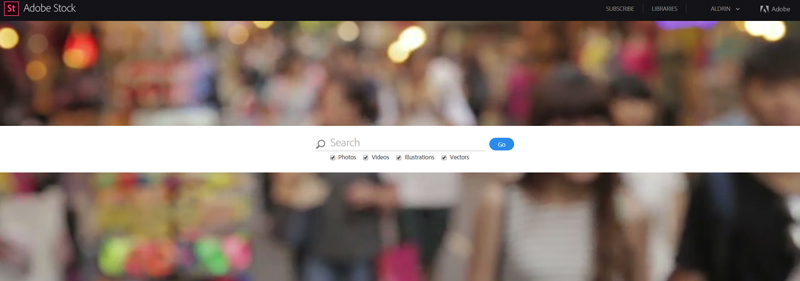
Good news to the creative community! Stock Photo Secrets offers yet another amazing stock photo deal. The ever generous stock photo company provides creative professionals with the opportunity to download and use 10 free Adobe Stock photos. The limited time offer is available until April 30, 2016, so you should hurry and take the deal. Just click on the link to start your free month.
About Adobe Stock
Adobe Stock is one of the leading stock photo agencies in the market. It provides creative professionals with a library, filled with over 50 million premium quality stock images. The library is also directly integrated with Creative Cloud applications, which makes the design process easier, faster and better. The stock photo website also offers purchase choices that meet every creative users’ needs. You just select between paying per image and subscribing to a plan.
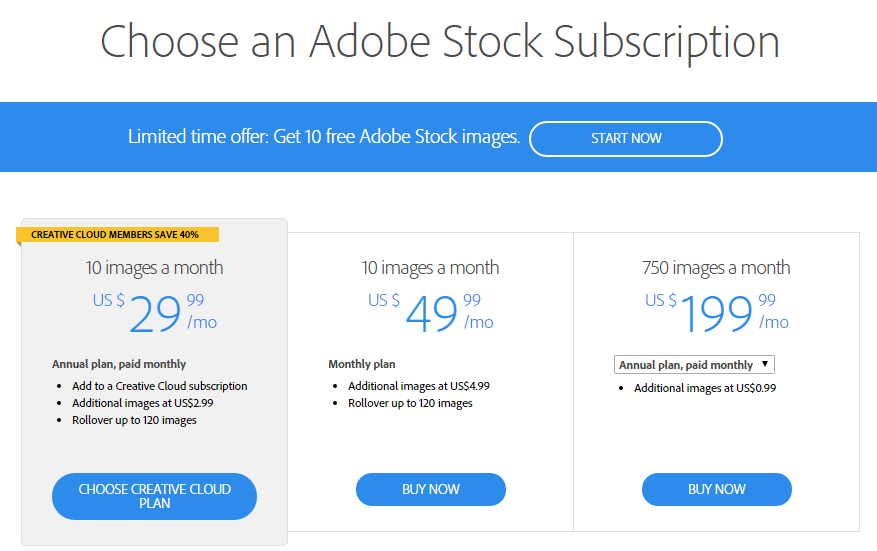
Pay per image is perfect if you only require a few images occasionally, while subscription plans are suitable of you use plenty of stock images on a regular basis. Adobe Stock offers annual plans that meet your needs – 750/month for heavy users, 350/month for average users, and 10 images/month for light users. All plans allow you to purchase additional images at different rates if you require more images that you initially paid for.
Free Adobe Stock Photos
Currently, Stock Photo Secrets offers a limited time offer that comes with the 10 images/month subscription plan. For your information, the image plan allows you to download 10 images per month with additional images priced at $2.99 each. It allows you to rollover up to 120 images onto the next month, too. It is an annual plan, but it is paid monthly. With the Adobe Stock promo, you can get the first 10 stock photos for free.
How does the offer work? The promo gives you 10 free high quality images to use within the next month. Your first month will be refunded when you sign up for the annual 10 image/month plan, which is priced at $29.99 plus applicable taxes. The first month is cancel risk free, so you can cancel your subscription anytime within the first month without charges. At the end of the offer term, your subscription will be automatically billed with standard rates, unless you cancel or change it.
If you are looking for a great deal on Adobe Stock photos, you should check out Stock Photo Secrets. It is affiliated with AS, making it a trusted and reliable source of stock photo deals. Hurry and get 10 free Adobe Stock photos on your first month. If you are a new subscriber, you will be automatically refunded for the first month of Adobe Stock. Start your free month now!
If you are having a hard time finding stock photos or other images on the Internet, you need to try iStockphoto. IStockphoto is a fun and easy way to find curated and royalty-free images at a reasonable price. IStockphoto is owned and operated by Getty, a name synonymous with high-quality stock photos. The service provides access to millions of images that can be used for just about anything imaginable. But, before you can choose one of the fabulous photos that are on iStockphoto, you need to know a little more about the service.
How does iStockphoto work?
The images you can find on iStockphoto come from contributors. All of the content is vetted to guarantee it meets the high standards that are set by iStockphoto. When an image is downloaded, you purchase a license that allows you to use the file in a multitude of ways. Some possibilities include advertising efforts, websites, blogs, presentations, video productions, and podcasts. All iStockphoto images are royalty-free. So you can use them for as long as you want, within the terms of the license.
Extended licenses
If you need to use the images you purchase in more ways than the license allows, you have the option to purchase an extended license. An extended license allows a more expansive use of the licensed image. Some examples of instances when an extended license is necessary include:
Printed copies exceeding a quantity greater than 500,000
Printing newspapers, magazines or books
Product packaging
Items for resale
Online print-on-demand products
Multi-user access to files
Electronic templates for resale
What does “royalty-free” mean?
When a photo or another image is designated as “royalty-free” it means that the image comes with a standard license for use. After you initially pay for the image when you download it, you will not need to pay the photographer a royalty each time you use it.
Searching for files
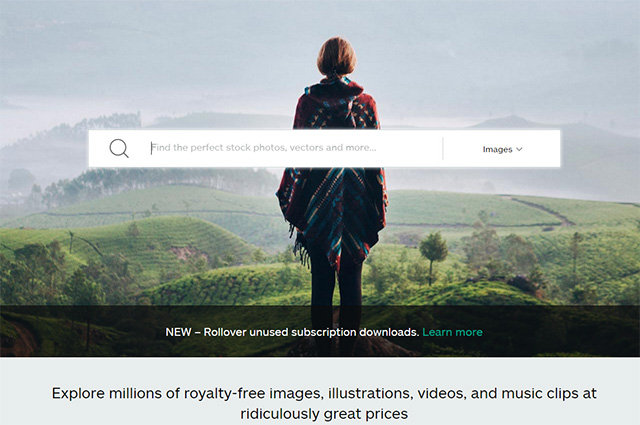
Since iStockphoto contains millions of images, there needs to be a way to search for what you need easily. The easiest and best way to search for images is with the use of keywords. Simply type keywords into the search bar at the top of iStockphoto’s website and then select the type of file you are looking for. As soon as your keywords are entered, you will see results that are related to it. You will have the option to apply filters to the search to narrow down your results.
What happens if you cannot find a file?
Occasionally, you may perform a search that comes up with zero results. In instances like these, there are a few possibilities that might be causing the problem. You may be searching for something too obscure or unusual or being too specific with your search parameters. In this case, if you have entered multiple keywords, pare it down to just the one or two that best describe the object for which you are looking. If you have applied filters, remove them to widen your search. If you are searching by file number, the image may no longer be available. In this case, contact iStock, and they will help you locate it.
Purchasing images on iStockphoto
To be able to download a file, you must purchase a royalty-free license. There are two ways to do so:
If you purchase credits, you can download files as you need them. You can purchase credits in preset packs that let you save money on downloads when you buy them in large quantities.
Image subscriptions provide access to a specific number of image downloads every month. There are multiple subscriptions from which to choose, to fit a variety of needs.
About credits
Credits can be considered currency that is exclusive to iStockphoto. You can use credits to download files of any kind. The larger preset package you purchase, the lower the per-credit cost is. Any file you purchase with a credit can be used in as many projects you use for an unlimited amount of time. Credits never expire as long as you use your iStock account as long as you sign into your account at least once a year. Unused credits packs may be returned for a full refund within 14 days of purchase. However, if any credits have been used from the pack, no refund can be granted.
Using photos from iStock
When you download a photo from iStockphoto, you automatically purchase a royalty-free license that allows you to use the image in a wide variety of ways. Some of the most common ways to use these images include:
Advertising
Publishing
Websites
Blogs
Presentations
With just a little bit of know-how, you can easily find and use stock photos with iStockphoto. Once you see everything you can accomplish with the stock photos you can find, you will quickly become a fan!






 If you are having a hard time finding stock photos or other images on the Internet, you need to try iStockphoto. IStockphoto is a fun and easy way to find curated and royalty-free images at a reasonable price. IStockphoto is owned and operated by Getty, a name synonymous with high-quality stock photos. The service provides access to millions of images that can be used for just about anything imaginable. But, before you can choose one of the fabulous photos that are on iStockphoto, you need to know a little more about the service.